
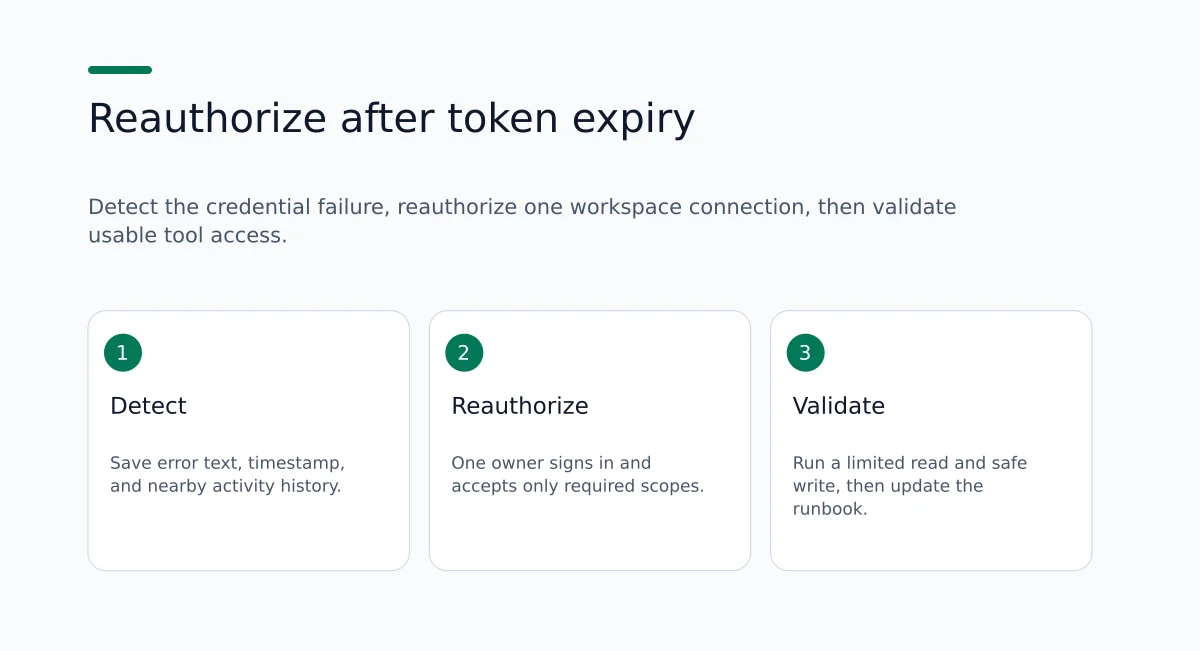
Answer up front: when an OAuth access token expires, provider API calls return authentication errors and actions that require that token fail. A compatible assistant can still draft text, propose next steps, or summarize information already in the conversation, but it cannot perform provider-side reads or writes that depend on a valid token until you reauthorize access. Verify exact error details with the provider and by reviewing your Ohdingle workspace activity history. Available detail can vary by event. If you cannot identify the failed call from the workspace entry, consult the provider logs next.
This article explains what usually happens when a token expires, how to detect the failure quickly, and a concrete reauthorization workflow you can run in a test workspace. It includes practical checks, a copy-ready runbook template, a comparison of centralized versus per-assistant connections, recommended validation steps, and clear limitations so you know what to expect. The guidance uses Ohdingle's connection model as the basis for a recommended reauthorization workflow.
Why this matters to an automation consultant
Automation consultants build chains of app calls that depend on valid credentials. When teams equate the presence of an integration record with usable tool access, they create an operational blind spot. That gap becomes visible when a provider token expires. The connection record can still appear in a management UI, but the assistant cannot complete the linked actions. The result is failed automations, stalled workflows, and time spent diagnosing whether the assistant, the connector, or the provider is at fault. Following the steps below helps you find the single cause faster, restore assistant actions, and document owners so your team can respond next time.
In a demo, a vendor may show that Gmail, a project board, or an ads account is connected. That label does not prove the assistant can read the latest launch email and write a follow-up task right now. Usable AI tool access means the assistant can call the tools available through the authorized account, with the permissions you granted, at the moment you need the action. An expired provider token breaks the second condition while the first label may still look fine.
A short concrete example
You have an assistant that summarizes the latest launch email and then adds a follow-up task to a project board. The board connection uses OAuth with the project-board provider. If that token has expired, the assistant will still be able to summarize the email in-chat and show a suggested task update, because those are conversational actions. But when it issues the provider write to create the task, the provider returns an authentication error and the write fails. The assistant can show the draft change, but it cannot apply that change to the project board until someone reauthorizes the connection for the account with the required scopes.
The same pattern shows up with other everyday chains: pull a website traffic report and compare channels, find a calendar block and draft a reschedule note, or open a Dropbox folder and list recent files. Conversation still works. Provider actions stop until credentials are valid again.
What usually happens when a provider token expires
- Provider API calls fail with authentication or authorization errors. The assistant cannot complete reads or writes that require that token.
- Conversation-only capabilities are still useful. The assistant can summarize earlier content, draft text, or list suggested next steps that a human can apply manually.
- If each assistant or agent uses separate credentials, you may need to reauthorize multiple connections. That increases operational overhead and recovery time.
- With a centralized workspace, a single reusable connection can restore access for many compatible assistants at once. The exact behavior depends on the provider’s OAuth rules, refresh token policy, and whether you use a service account or a personal account.
When a multi-step job fails, treat it as a credential and permission problem first. Confirm whether the connection still has the scopes the workflow needs, then reauthorize once under a named owner instead of reinstalling assistants or recreating integrations from scratch. That sequence keeps diagnosis narrow: error text and timestamp, connection record and scopes, owner contact, provider sign-in, limited validation action, and a short runbook note. Skipping the credential check often leads people to rebuild setup that was already correct except for the expired token.
Detect: how to spot an expired token fast
- Watch for assistant error messages
The assistant often returns an explicit authentication or permission error when it cannot call the provider API. Copy the full error message text and the timestamp. That phrasing helps you match the workspace and provider logs.
- Inspect the Ohdingle workspace activity history, with a caveat
Open the workspace activity history and review any entries near the failure time. Available detail can vary by event. If an entry is present, save a screenshot and any identifiers shown. If the entry is missing or too generic to identify the failed call, use provider logs next.
- Cross-check provider logs
On the provider side, search audit logs or API logs for the same timestamp. Look for 401 or 403 HTTP codes, or provider-specific error codes that indicate expired refresh tokens, revoked consent, or insufficient scopes. Provider logs often show a request ID you can tie back to the failure window using the timestamp and the assistant error text.
- Confirm the scope mapping before you reauthorize
Sometimes an expired token coexists with a scope change at the provider. Before reauthorizing, confirm which scopes the workflow requires and whether the previously granted scopes still match those needs.
- Check whether multiple assistants reference the same connection
If several assistants reuse one connection, the same expired token can break multiple automations. A centralized workspace makes this visible. If you use per-assistant credentials, failures may only appear for a single assistant.
- Note the connection owner in the workspace
Record who is listed as the connection owner in the workspace so you can contact them quickly to reauthorize or confirm account privileges.
Integration presence versus usable tool access
Use this distinction every time a multi-step AI job fails:
- Integration presence means a connection record exists and an app is listed among connected accounts.
- Usable tool access means the assistant can complete the specific read or write the workflow needs under currently valid credentials and currently granted permissions.
Ohdingle is built around the second definition in practice: you authorize apps in a workspace, then compatible assistants use the tools available through those connections with the access you authorize. Available tools depend on the app, your account, and the permissions granted to the connection. Check those permissions before relying on a workflow. That product caveat is the same operational rule consultants should put in client runbooks.
A practical way to teach the distinction on a call is to ask two separate questions. First: is the app listed as connected in the workspace? Second: can the assistant complete the exact read or write this job needs right now under the scopes on that connection? Answering yes to the first and no to the second is the signature of token expiry, revoked consent, or a scope mismatch. Answering no to the first means you still need to connect the account. Answering yes to both means the failure is elsewhere (prompt design, wrong account, or a provider outage).
A 6-step reauthorization workflow (start here)
Use this recommended workflow to detect the failure, find the connection, notify its owner, reauthorize, validate access, and record the result. Confirm the exact controls in the current Ohdingle interface and the provider's documentation. Try the procedure in a test workspace before using it in production.
Step 1: Detect
- Save the assistant error text and the exact timestamp.
- Open the workspace activity history and review any entries near the failure time. If an entry is present, save a screenshot and any identifiers shown. If the entry is missing or too generic, record that fact so you can request provider logs.
Step 2: Surface the connection
- Open the Ohdingle workspace connection details for the provider.
- Record the authentication type you see in the UI: OAuth, API key, or custom connector.
- Note the account or email used for the connection, and list the OAuth scopes or permissions shown at connection time.
- If the connection entry shows a recent refresh or expiry timestamp, record it.
Step 3: Notify owner
- Assign one reauthorization owner and record their contact details in the runbook. This prevents multiple people signing in at once or changing scopes by mistake.
- If you have an on-call rotation or support roster, add the next backup contact.
Step 4: Reauthorize
- Use the provider link in the Ohdingle connection UI to sign in to the account that holds the required privileges.
- Accept only the scopes required by your workflow. If the provider prompts for extra permissions that are not necessary, decline them.
- If the provider supports refresh tokens, confirm in the provider UI whether refresh tokens will be issued and whether they will refresh automatically.
- When possible, prefer a service account or dedicated integration account to avoid tying long-lived access to a single employee.
Step 5: Validate
- Run a limited test that mirrors the failed action. For example, read one record and apply a safe, reversible change such as adding a test label or updating a test task.
- After the test action, check workspace activity history for a related success entry and save whatever identifiers or timestamps are shown. If detail is insufficient, save the matching provider log entry instead.
Step 6: Record
- Log the reauthorization owner, the date and time, and any scopes that changed during the process.
- Add a calendar reminder or a monitoring check if the provider exposes refresh token expiry metadata.
- Update the workspace runbook with the validation results and any provider-specific behavior you observed.
Detailed validation checks to include
Map scopes to steps. For each workflow step, list the specific OAuth scope or permission required to complete it. Keep that scope map in your runbook so future responders can check scope coverage quickly.
End-to-end sample. Test one complete item: list, open, change. For example: list tasks in the board, open a task, update its label. This test shows whether the assistant can perform the full chain and uncovers permission gaps where read works but write does not.
Permission boundary test. Test read-only actions first, then test writes. This isolates whether read or write permissions are failing.
Workspace versus provider logs. If the workspace entry shows only a generic error, use provider audit logs to identify the exact failed endpoint and error code. Cross-reference timestamps and any request IDs available from the provider to avoid misattributing the failure.
Multi-assistant impact check. After reauthorization, trigger the same action from another assistant that uses the same connection. That confirms whether reuse across assistants works as expected.
Least-privilege check. Confirm that the granted scopes are no broader than necessary. If a workflow does not need admin rights, do not grant them.
How Ohdingle’s connection model supports this runbook
Ohdingle connects business apps to compatible AI assistants. You authorize the apps in a workspace, then use their available tools from your assistant. The product site describes a straightforward setup path: connect the apps you need, add a compatible AI assistant that supports remote MCP, then use the tools available through those connections with the access you authorize. Connection control stays with you: choose the connections, review permissions during setup, organize connections by workspace, and disconnect an app when you no longer want Ohdingle to use it.
Examples the product site highlights include reviewing the latest email, reading a project board for items waiting on review, and pulling a website traffic report to compare acquisition channels. Those examples are useful validation targets after reauthorization because they mix reads across different providers and make it obvious when conversation still works but tool access does not.
Supported app categories on the product site include Gmail, Google Calendar, Google Ads, Meta Ads, Google Analytics, Dropbox, Monday, Klaviyo, Notion, Ahrefs, Cloudflare, and Dokploy, with the option to add a custom app when it exposes a compatible MCP endpoint. Each app has its own permissions and setup requirements. Support for individual tools and authorization methods varies by assistant. Will every app action be available? No. Available tools depend on the app, your account, and the permissions granted to the connection.
Ohdingle Professional is listed at $99.00 per month and markets one secure AI workspace, reusable app connections, centralized permissions, activity history, compatible AI assistants, and priority support. Review billing terms in your MaxQ account before payment. Pricing and package details are published on the Ohdingle billing packages listing.
For consultants, the practical value of that model during token expiry is concentration: one place to see which account is connected, which permissions were accepted at setup, and which activity entries sit near the failure time. Reusable connections mean you reauthorize the shared account once rather than repeating OAuth for every assistant that touches the same provider. Centralized permissions make it easier to keep the scope map next to the connection record. Activity history gives you a starting point for correlation even when you still need provider logs for exact request IDs.
A short runbook template you can copy
- Connection name: [provider name]: [account email]
- Auth method: OAuth (refreshable / non-refreshable) or API key
- Scopes granted: [scope list]
- Reauthorization owner: [name, email, phone]
- Last reauthorized: [YYYY-MM-DD]
- Validation steps: 1) Read one record, 2) Add a test label, 3) Confirm a related workspace activity entry or provider log shows success
- Recovery link: [Ohdingle connection UI link]
- Notes: [privilege needs, provider special behavior]
Checklist: separate integration existence from usable tool access
- Confirm connection presence in Ohdingle. A connection record proves an integration exists, not that it currently works for all actions.
- Confirm scope mapping. The existence of a connection does not prove the assistant can perform every workflow step. Map scopes to steps and keep the mapping in the runbook.
- Run an end-to-end sample action. Seeing the assistant complete the full chain proves usable tool access.
- Track owner and runbook. Make it fast for staff to find who can sign in if something breaks.
- Use one shared workspace for client or team accounts when assistants support remote MCP-style connections. That avoids duplicate per-assistant connections and simplifies reauthorization.
Compare two approaches: centralized workspace versus per-assistant credentials
Centralized workspace (Ohdingle model)
- Advantages: One reusable connection many assistants can use; central place to manage permissions and activity history; fewer credentials to reauthorize.
- Cautions: A single compromised connection affects all linked assistants until you revoke it. The provider’s refresh token and consent rules determine how long reauthorization will remain valid.
Per-assistant credentials
- Advantages: Isolation between assistants. If one assistant’s token expires or is compromised, other assistants are not affected.
- Trade-offs: You must maintain and reauthorize more credentials. That increases the chance of inconsistent scope grants and makes incident investigation harder.
Which fits your setup
Pick a centralized workspace when your assistants support remote MCP-style external tool connections and you want a single place to manage permissions and activity logs. Choose per-assistant credentials if you need strict isolation between assistants or if some assistants cannot accept external connections.
For consultants handing work between personal demos and client delivery, workspace organization matters as much as the auth method. Keep client and team connections in the right workspace so the accounts available for a job match the accounts the client approved. Avoid mixing a personal account into a client automation, which can leave ownership and renewal unclear when the token expires.
When you hand a client a delivery package, include the connection name, the account email that owns OAuth consent, the scope map, and the named reauthorization owner. That packet turns a vague “the integration broke” message into a short path: open the workspace, open the connection, sign in as the listed owner, accept the listed scopes, run the listed validation action.
Practical sandbox tests to run (recommendations, not performed tests)
These are recommended validation exercises. They are not claims that Ohdingle or this article already ran the tests for your accounts.
- One-app sandbox
- Create a test workspace and connect a single provider account.
- Record the exact scopes requested during connection and save that note in the workspace runbook.
- Run a read-only assistant action and review activity history afterward for any related entry.
- Invalidate the token
- If the provider allows it, revoke the token or sign out from the connected account to simulate expiry.
- Re-run the same assistant action and confirm the assistant now returns an authentication or permission error. Save screenshots of the assistant message and any workspace activity entry near that time.
- Reauthorize and validate
- Reauthorize the connection from the Ohdingle workspace.
- Repeat the initial test action.
- After the test action, check workspace activity history for a related success entry and save whatever identifiers or timestamps are shown. If detail is insufficient, save the matching provider log entry instead.
- Record the reauthorization date and the reauthorization owner in the runbook.
- Multi-assistant sandbox
- Connect the same provider account to multiple test assistants via the shared connection and confirm that reauthorization restores access for each assistant.
- After reauthorization, trigger the same action from a different assistant. Note: workspace activity detail may vary, so capture provider logs if you need precise request IDs.
Recommended monitoring and governance practices
Grant minimal scopes. Only give the scopes required for the workflow. Narrow scopes reduce the blast radius if a token is compromised.
Name owners and contacts. Each connection should have a named owner and a backup contact listed in the runbook.
Snapshot activity entries during incidents. Export or screenshot workspace activity entries as soon as you identify a failure so you can correlate them with provider logs. Do not assume every entry includes a request ID, failed endpoint, or assistant identity. Capture what is shown, then fill gaps from the provider.
Set reauthorization reminders. If the provider exposes refresh token expiry metadata, set a reminder ahead of expiry. If the provider does not expose expiry metadata, set a calendar check that matches typical token lifetimes for that provider.
Emergency revocation process. Document how to disconnect the connection in the workspace to stop further assistant requests when you detect a compromise. Ohdingle’s product guidance states you can remove an app connection from its settings when you no longer want Ohdingle to use it.
Use dedicated integration accounts. When a provider supports machine or service accounts, prefer them for long-lived connections instead of personal accounts tied to a single person.
Security and compliance notes
Align audit logs. Ensure provider-side audit logs and the Ohdingle activity history are both accessible to your security team so forensic traces can be correlated where detail exists on both sides.
Apply the principle of least privilege. Avoid broad, write-heavy scopes unless automation truly needs them. For example, if the automation only needs to add comments, do not grant admin rights.
Fast revocation plan. Keep a documented sequence for quickly revoking a compromised connection and an alternate manual process to continue urgent work until the connection is restored.
Check data residency and provider policies. Some provider tokens and audit metadata vary by account type and region. Confirm any compliance constraints with the provider’s documentation before granting broad automation permissions.
What to log in incident reports
- Time of first failure and identity of the assistant or user that triggered it, if known from the conversation or your own process notes.
- Screenshots or exports of workspace activity entries near the failure, including any identifiers shown.
- Provider log entries or request IDs, if available.
- Reauthorization owner and timestamp of reauthorization.
- Actions taken to validate and restore access.
- Any changes to scopes or account privileges performed during recovery.
When to call support versus reauthorize yourself
Call support when:
- Workspace activity entries do not identify the failed request and provider logs are insufficient.
- You suspect a broader platform issue, not an expired token.
- You need help tracing requests across assistants or users.
Reauthorize yourself when:
- The failure is an authentication error tied to a known connection and you or the assigned owner can sign in to the provider account.
- The provider shows a normal expiry or you revoked the token for testing.
One useful next action
Create a test workspace and run the 6-step reauthorization workflow yourself. Start here: Create an Ohdingle workspace and sign up. As you run the workflow, confirm the accepted scopes, name the reauthorization owner, and capture activity entries or provider logs so your team knows who to contact and why the assistant failed when a token expires. For product orientation before you pay, compare plans and connection guidance on the Ohdingle product site and review the Professional package listing.
Operational playbook snippets (copy-and-paste-ready)
Incident ticket summary (short)
- Title: [Provider] automation failures - authentication errors observed
- Time: [first failure timestamp]
- Impact: Assistant unable to perform writes to [provider] for [workflows affected]
- Immediate action: Review Ohdingle workspace activity history and provider logs; contact reauthorization owner.
Slack/IM notification template
- Channel: #automation-ops
- Message: "Automations to [provider] failing with authentication errors since [timestamp]. Investigating. If you are the connection owner, please check the Ohdingle workspace and reauthorize using the connection link. See runbook: [runbook link]."
Post-incident notes: Root cause analysis items
- Was the token expired, revoked, or replaced by provider policy change?
- Were scopes reduced or changed since last authorization?
- Did multiple assistants fail simultaneously (shared connection) or one assistant only (per-assistant credential)?
- Were provider logs present and adequate to identify the failing endpoint and error code?
- Recommended follow-up: adjust runbook, set reminder, consider dedicated integration account.
Example incident timeline to capture
Use this as a documentation template for how to record events during recovery. The times are labels for sequencing notes, not a measured incident.
- T0: Assistant user triggers "Create follow-up task"; assistant returns a permission or authentication error. Capture screenshot, assistant message text, and user identity if known.
- T0+1: Open workspace activity history near that time. Save a screenshot of any related entry and any identifiers shown. If the entry is missing or generic, note that and move to provider logs.
- T0+2: Check provider logs for matching timestamp; look for 401 or 403 responses and any request ID referencing the integration account. Save provider audit entry or screenshot.
- T0+3: Assign reauthorization owner and post to the ops channel. Owner reauthorizes via Ohdingle connection link.
- T0+4: Run test: read a test record and add a label. After the test, check workspace activity history for a related success entry; if detail is thin, save the provider success log instead.
- T0+5: Update runbook with reauthorization owner, date, and note whether scopes changed.
RACI for connection reauthorization
- Responsible: Reauthorization owner (per runbook)
- Accountable: Automation lead or systems administrator
- Consulted: Security team (if compromise suspected), provider support (if provider logs insufficient)
- Informed: Stakeholders whose workflows rely on the assistant
Teaching the distinction during client onboarding
Spend a few minutes in onboarding walking through one live connection and one failed-action simulation in a sandbox. Show the connection record in the workspace. Show the scopes accepted at setup. Show a successful limited action. Then, if the provider allows a safe revoke, show the same action failing with an authentication error. Walk the client through the six steps using the runbook template. The goal is not to prove a product claim; it is to make the difference between inventory and live access concrete before a production token expires under deadline pressure.
Write the scope map as a table with three columns: workflow step, required permission or OAuth scope, and validation action. Example rows for a launch follow-up chain might be: read latest email about the launch (mail read scope; ask the assistant to summarize the latest matching message), create a board task (board write scope; create a labeled test task and delete it), and optional calendar note (calendar write scope; create a short test event in a sandbox calendar). Keep that table next to the connection entry so the next owner can check coverage without reverse-engineering the automation.
Frequently asked questions (short answers)
Q: Can I rely on Ohdingle to automatically refresh tokens for me?
A: Ohdingle centralizes connections so multiple assistants can reuse them, but token refresh behavior depends on the provider. Confirm whether refresh tokens are supported and whether they will be renewed automatically or require manual reauthorization. See the Ohdingle product page for connection guidance: Ohdingle.
Q: Does deleting a connection undo provider-side changes?
A: No. Deleting a connection only stops further automated requests. Any changes already applied on the provider remain until you reverse them with provider-side actions.
Q: How do I reduce the risk of repeated outages when tokens expire?
A: Use dedicated integration or service accounts where possible, map scopes carefully to limit privileges, name owners, and set calendar reminders or monitoring for token expiry metadata if providers expose it.
Q: What if my assistant does not support remote MCP?
A: Ohdingle works with compatible AI assistants through remote MCP. Assistants without that capability cannot use the shared workspace connection model the same way and may still need per-assistant setup. Check the assistant’s connection instructions in your workspace and the assistant vendor’s docs.
Q: Can I bring my own connector?
A: You can add a custom app when it exposes a compatible MCP endpoint. Its authentication and capabilities determine what your assistant can use.
Q: What should I tell a client who only wants “the integration fixed”?
A: Translate the request into three checks: is the connection still listed, are the required scopes still granted, and can the assistant complete one limited end-to-end action right now? Fixing usable access means restoring valid credentials and confirming those three checks, not only confirming that an app name appears in a list.
Limitations to keep visible in client proposals
- Removing a connection prevents new requests but does not reverse provider-side changes already completed.
- Ohdingle can reuse connections only with assistants that support external remote MCP-style connections; assistants without that capability require per-agent setup.
- Token refresh behavior depends on the provider’s OAuth implementation and account privileges; some providers require manual reauthorization.
- Not every app action is available even when a connection looks healthy. Tools depend on the app, account privileges, and granted permissions.
- Activity history is a plan feature useful for troubleshooting, but entry detail is not guaranteed to include every field you might want for forensics. Plan to use provider logs as the system of record for request IDs and exact error codes when workspace detail is thin.
Sources and verification
This article describes a recommended reauthorization workflow based on Ohdingle's documented connection model. For product details and to create a workspace, see Ohdingle and the Ohdingle billing package listing at MaxQ Interactive billing API. Related reading on this site includes the blog index and the home page overview.
Summary checklist you can paste into an incident ticket
- Error message and timestamp noted.
- Workspace activity history reviewed near the failure; screenshot saved if an entry exists.
- Provider logs checked for failed request IDs when workspace detail is insufficient.
- Connection owner identified and contacted.
- Reauthorization performed via Ohdingle UI with only required scopes accepted.
- Limited test action executed; related workspace activity or provider success log captured.
- Runbook updated with owner, date, and scope changes.
Keep the distinction sharp for the next client handoff: an integration record is inventory. Usable AI tool access is a live credential plus the right scopes plus a named person who can restore both when a provider token expires.